Biru Samudera

Biru Samudera

Overview

Glints: 🧾 Applications Record

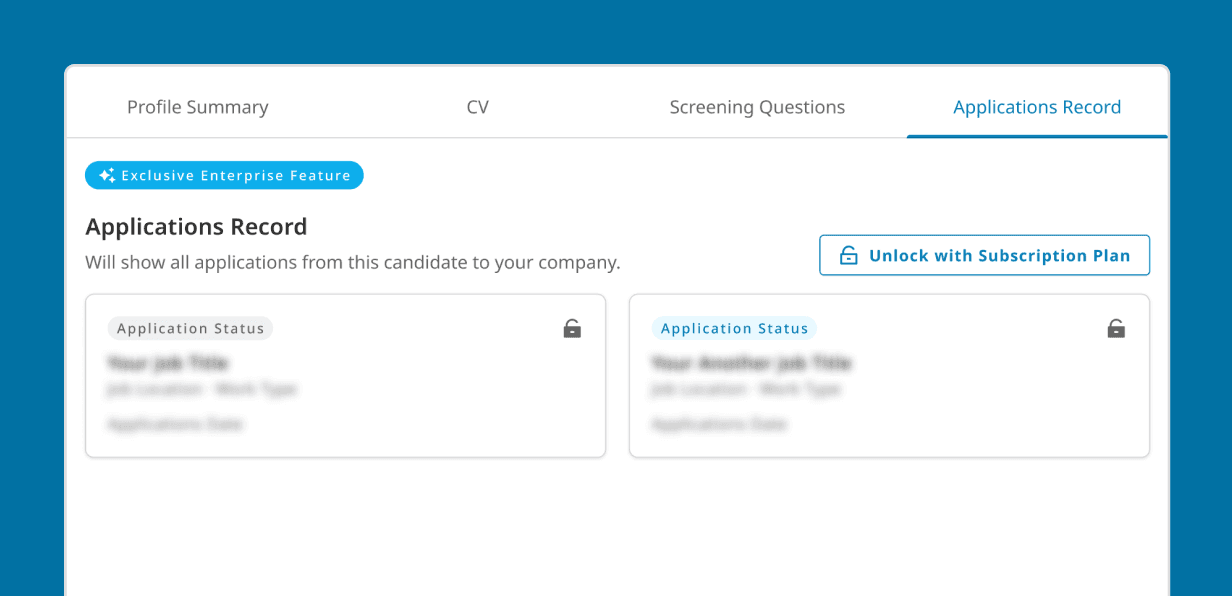
Applications Record is an enterprise feature that lets employers see a candidate’s past applications to their company.

Role

Product Designer

Platform

Website

Duration

Design: 29th Apr - 9th May

Design:

29th Apr - 9th May

Dev : 13th May - 30th May

Dev :

13th May - 30th May

Released : 5th June

Collaborator

Jenny Tjhio

Product Manager

Tung An

Design Lead

Afzal

Senior Engineer

Andi Awwal

Senior QA Engineer

Situation

Enterprise clients kept asking one simple question:

Enterprise clients kept asking one simple question:

Clients said:

Clients said:

“Can we see if this candidate has applied to other roles in our company?”

“Can we see if this candidate has applied to other roles in our company?”

Enterprise prospects kept asking this question during sales calls.
Even an existing client mentioned that “competitors already have this.”

It wasn’t just a feature request, it was a sign that our product was missing something essential for enterprise trust.

Enterprise clients kept asking one simple question:

Enterprise prospects kept asking this question during sales calls.
Even an existing client mentioned that “competitors already have this.”

It wasn’t just a feature request, it was a sign that our product was missing something essential for enterprise trust.

Exploration

To understand what “application history” should look like, I explored competitors.

To understand what “application history” should look like, I explored competitors.

That contrast helped me realize something simple but important:
clarity can feel more “enterprise” than complexity.

That contrast helped me realize something simple but important:
clarity can feel more “enterprise” than complexity.

First Design Approach

Starting from structure

Starting from structure

INITIAL DESIGN

I started with what felt logical, a structured layout showing roles, statuses, and dates in a grid. It seemed like the most organized way to present history data.

I started with what felt logical, a structured layout showing roles, statuses, and dates in a grid. It seemed like the most organized way to present history data.

CHALLENGES

But when I checked it with real data, the illusion broke.
Most candidates only had 1–2 past applications, so the layout looked awkwardly empty, like a design waiting for more data that would never come.

But when I checked it with real data, the illusion broke. Most candidates only had 1–2 past applications, so the layout looked awkwardly empty, like a design waiting for more data that would never come.

Breakthrough

During design review with my PM and Design Lead, one line stayed with me:

During design review with my PM and Design Lead, one line stayed with me:

They said:

They said:

“If the data is small, the design shouldn’t try to look big.”

“If the data is small, the design shouldn’t try to look big.”

DESIGN ITERATION

That reframed everything.
I replaced the table with compact, borderless cards. Simple like Jobstreet, concise like Dealls!, and grounded in our real use case.

That reframed everything.
I replaced the table with compact, borderless cards. Simple like Jobstreet, concise like Dealls!, and grounded in our real use case.

Even one record now looked intentional, and the page finally felt balanced.

Even one record now looked intentional, and the page finally felt balanced.

Final Design

Each past application appears as a small card showing the role, date, and status. Clean, confident, and easy to scan.

Each past application appears as a small card showing the role, date, and status. Clean, confident, and easy to scan.

Impacts

Enabled Enterprise Deal Wins

Strengthened negotiations with one big enterprise client and other key clients.

Validated Market Deman

Existing clients requested the same feature after release, proving product fit.

Reflections:

  1. Design should fit reality. Overbuilding for small data creates false complexity.

  2. Clarity scales better than density. Light, simple visuals communicate confidence faster.

  3. Sometimes the most “professional” layout isn’t the most practical one.

See potential here?

Let’s chat and design solutions tailored to your business needs.

Create a free website with Framer, the website builder loved by startups, designers and agencies.